Getting Sassy with styled-components
Progressively migrating your app from Sass to styled-components seems daunting, but with a couple of quick tips and the right tooling it's a joy!
The Basic Button Component
Initial Sass Implementation
.btn {
  border: none;
  border-radius: $base-radius;
  cursor: pointer;
  display: inline-block;
  font-size: $base-font-size;
  font-weight: $font-semibold;
  line-height: 2.5;
  padding: 0 12px;
  position: relative;
  text-align: center;
}
Converting to styled-components
The conversion process involves three steps: importing styled-components, defining the component using styled.button, and copying base styles into a template literal:
import styled from 'styled-components';


const Button = styled.button`
  border: none;
  border-radius: ${props => props.theme.baseRadius};
  cursor: pointer;
  display: inline-block;
  font-size: ${props => props.theme.baseFontSize};
  font-weight: ${props => props.theme.fontSemibold};
  line-height: 2.5;
  padding: 0 12px;
  position: relative;
  text-align: center;
`;
Usage: <Button>Click Me</Button>
Button Variants with Interpolations
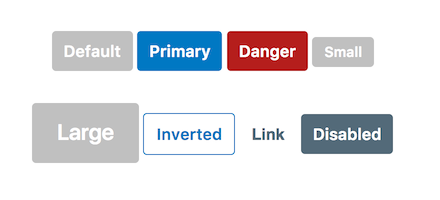
Styled-components enables dynamic styling through interpolated functions receiving component props:
const Button = styled.button`
  background-color: ${props =>
    (props.primary && props.theme.primary)
    || (props.danger && props.theme.danger)
    || ((props.inverted || props.link) && '#fff')
    || (props.disabled && props.theme.brandGrey)
  };
  color: ${props =>
    (props.inverted && props.theme.primary)
    || (props.link && props.theme.baseFontColor)
    || '#fff'
  };
  cursor: ${props => props.disabled ? 'not-allowed' : 'pointer'};


  &:hover {
    ${props => props.link && 'text-decoration: underline;'}
  }
`;
Reusing Variables with Themes
The Problem
The component references Sass variables that aren't valid CSS values. Rather than hardcoding values, the solution preserves variable reusability through styled-components theming.
Solution: ThemeProvider
Styled-components provides a <ThemeProvider> wrapper accepting a theme object with key-value pairs, making theme data available to all child components.
Extracting Sass Variables
The sass-extract and sass-extract-js packages convert Sass variables into JavaScript objects:
npm install -D sass-extract sass-extract-loader node-sass sass-extract-js
import React from 'react';
import ReactDOM from 'react-dom';
import { ThemeProvider } from 'styled-components';
import Button from './components/Button';


const theme = require(
  'sass-extract-loader?{"plugins": ["sass-extract-js"]}!./vars.scss'
);


const App = () => (
  <ThemeProvider theme={theme}>
    <div>
      <Button primary>Click Me</Button>
    </div>
  </ThemeProvider>
);


ReactDOM.render(<App />, document.getElementById('root'));
When a Button Isn't a Button
The withComponent() Method
To render the Button as an anchor tag without duplicating styles, use the withComponent() method:
import Button from './components/Button';


export const BtnLink = Button.withComponent('a');
This creates a new component that retains all the styles defined for our Button but simply renders an <a> tag.
Conclusion
While migrating a full application to styled-components represents significant effort, with its support for themes and great tools like sass-extract and sass-extract-js we don't need to transition all at once. Teams can incrementally adopt styled-components for new components while maintaining consistency with existing Sass-based styles.